Armorsmith Designer uses a Y up coordinate system and Metric units by default
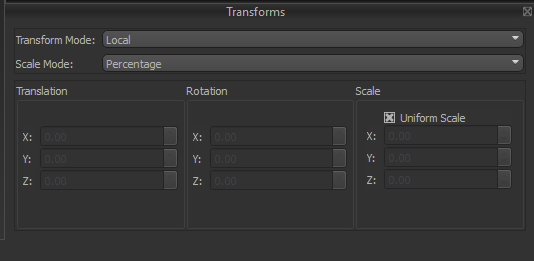
Transform Mode
The Transform Mode determines which coordinate system is used when moving, rotating, and scaling the selected object.Local
Local
Applies transformations relative to the object’s own orientation. As an object rotates, its local X, Y, and Z axes rotate with it, making this mode ideal for editing individual parts in their own coordinate space.
World
World
Applies transformations relative to the global coordinate system. The world axes remain fixed regardless of the object’s orientation, making it easier to align objects consistently throughout the project.
Scale Mode
The Scale Mode determines how values entered into the Scale section are interpreted.Percentage
Percentage
Scale values are entered as percentages relative to the object’s original size. A value of 100% represents the original dimensions, while values below or above 100% decrease or increase the size proportionally.
Absolute
Absolute
Scale values are entered using real-world dimensions. Rather than specifying a percentage, the object is resized so its dimensions match the values entered for each axis.
Translation
The Translation section controls the position of the selected object within the Work Area.
The values shown represent the object’s current position using the selected Transform Mode.
Rotation
The Rotation section controls the orientation of the selected object.
Rotation values are measured in degrees.
Scale
The Scale section controls the size of the selected object.
The values entered are interpreted according to the selected Scale Mode.